
Last updated: 18 Agustus 2026
Funding Your Binomo Account: A Deposit Walkthrough
Topping up is straightforward. Sign in, head to the Deposit or Cashier section, select how you want to pay, type in the sum you have in mind (never below USD 10 (≈ Rp140.000)), and follow the on-screen prompts to finish. Once it clears, the money normally lands in your trading balance within a short window.
Which options appear depends on where you are, and the list gets revised now and then. Only ever pay through the genuine Binomo cashier once you are logged in. Nobody claiming to be a private "agent" should ever receive a transfer to their own account.
Decide up front how much you are truly willing to part with before you add a cent. Since fixed-time trading carries steep risk and the majority of retail traders end up down, it makes far more sense to begin at a modest figure (roughly the floor) than to hand over a large amount at once. Hold on to every receipt, remember which method you paid with — withdrawals frequently have to return the same way — and steer clear of committing money you still need for everyday costs.
| Minimum deposit | USD 10 (≈ Rp140.000) |
|---|---|
| Account currencies | USD, EUR, IDR (€ / Rp / $) |
| Demo account | Yes (virtual balance, resettable) |
| Methods | E-wallet · Bank/VA · Crypto |
| Deposit fee | None (0 fee) |
Ways to pay (for users in Indonesia)
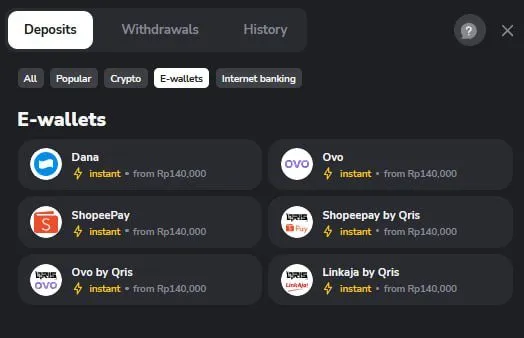
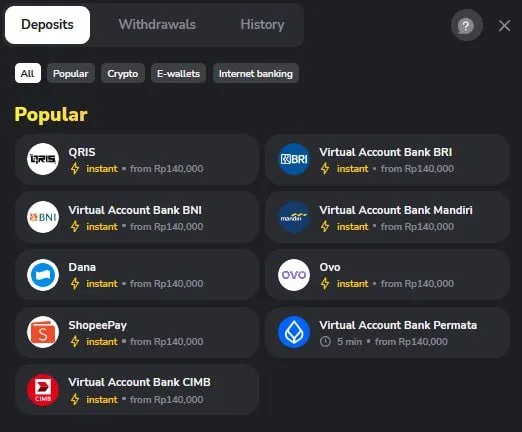
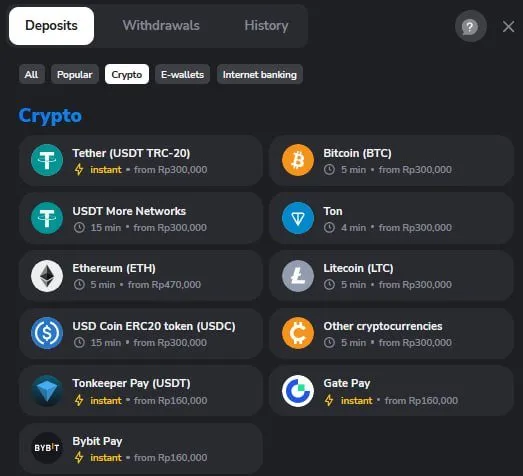
Looking at Binomo's cashier for Rupiah accounts, the three families of methods listed below are on offer. The pleasant part: according to the cashier itself, adding funds costs nothing (0 fee). Bear in mind the floor amounts and how long each takes are subject to change, so confirm the current details on the official cashier every time you deposit.
E-wallets
Dana, OVO, ShopeePay, LinkAja
Typically instant · from Rp140,000
Internet banking / Virtual Account
QRIS, VA BCA, BRI, BNI, Mandiri, Permata
Instant (Permata within ~5 min) · from Rp140,000
Crypto
USDT (TRC-20 & other networks), Bitcoin (BTC), Ethereum (ETH), Litecoin (LTC), etc.
About 5–15 min · from Rp300,000 (ETH from ~Rp530,000)
What the Binomo cashier actually shows
The images below were captured straight from Binomo's cashier on a Rupiah account, so they reflect the real methods and floor amounts in use. Keep in mind the layout can be redesigned at any point.
Filling your balance, step by step
-
Sign in to your account
Begin by logging into your existing Binomo account. Not registered yet? Set one up first — there's no charge.
-
Reach the Deposit section
Tap the Deposit button, or the wallet/cashier icon sitting on your dashboard.
-
Set your method and sum
Settle on a payment option and key in no less than USD 10 (≈ Rp140.000). Also mind which currency your account uses (USD, EUR, IDR (€ / Rp / $)).
-
Wrap up the payment
Work through whatever your chosen method asks of you (a card or e-wallet confirmation, say), and file away the receipt.
-
Confirm your balance
As soon as the payment is verified, your trading balance refreshes on its own. Still nothing showing? Head to the troubleshooting notes further down.
Deposit stuck or bounced? Here's how to sort it
- Payment stuck on pending or not showing
- Give it a few minutes — certain methods wait on network confirmation first. Comb through your email and transaction log. If it lingers well past that, reach out to official support with your payment proof attached.
- Card or bank payment refused
- Confirm your card has online/international payments switched on, holds enough balance, and that every field was entered correctly. Still no luck? Switch to a different method.
- Charged but balance didn't move
- Stay calm and resist firing off another deposit blindly. Secure your receipt and get in touch with Binomo's official support, quoting the transaction ID.
- Sum rejected for being under the floor
- The lowest you can put in is USD 10 (≈ Rp140.000). Bump your figure up until it clears that threshold.
- Told to send money to someone's personal account
- Treat that as a fraud warning. A legitimate deposit only ever runs through the Binomo cashier inside your own account. Never wire funds to anybody's private account.
Deposit questions, answered
What is the smallest deposit Binomo allows?
You can start from USD 10 (≈ Rp140.000). If you'd rather not commit anything yet, the free demo account lets you rehearse first with no deposit at all.
Will I be charged to deposit?
The Binomo cashier states that adding funds is entirely free (0 fee). The floor amount and timing shift from one method to another — check the breakdown above. Withdrawal charges live on the Fees page.
How quickly does the money arrive?
A few methods post right away, while others sit until they're confirmed. If it drags on longer than seems reasonable, contact support and bring your receipt.